



Description
Calm Coffee Sim with ASMR & Customization
Overview
Good Coffee, Great Coffee is a free simulation game developed by TapBlaze, offering players a charming virtual café experience. As a barista and coffee shop owner, players manage daily operations by crafting a variety of coffee drinks, serving customers, and upgrading their shop. The game emphasizes relaxation, combining soothing background music, satisfying ASMR sounds, and a cozy visual aesthetic to create an immersive atmosphere. With over 200 unique customers, each possessing distinct personalities and drink preferences, players must deliver personalized service to boost satisfaction and grow their business. The game supports both Windows and Mac, making it accessible to a broad audience of casual gamers and coffee enthusiasts. Real-world usage scenarios include stress relief, creative expression through drink customization, and light entertainment during breaks. The developer did not provide additional system requirements, and performance details were not specified. Despite its engaging concept, some users have reported frequent crashes, particularly at game start, which may affect continuity. Still, the core experience remains enjoyable for those seeking a peaceful, immersive simulation.
Key Features & Capabilities
- Coffee Crafting System: Players prepare a wide range of drinks including Espresso, Americano, Cappuccino, and Latte, using various ingredients like oat milk, orange syrup, chocolate chips, and strawberries.
- Customer Management: Over 200 unique customers with individual personalities, stories, and coffee preferences require attentive service to maintain satisfaction and unlock progression.
- Latte Art Creation: Players can design intricate latte art, adding a creative and visually rewarding layer to the coffee-making process.
- Shop Customization: Expand and personalize your café with diverse furniture, decorations, and design options to reflect your style and enhance the ambiance.
- Business Progression: Earn in-game currency to upgrade equipment, unlock new recipes, and expand your shop’s capacity and appeal.
- ASMR & Ambient Audio: Immersive sound design with realistic brewing, pouring, and serving sounds enhances the sensory experience, supporting relaxation and focus.
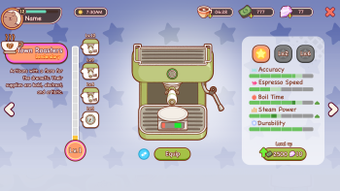
These features combine to create a multi-layered simulation experience. For example, crafting a custom latte with strawberry syrup and heart-shaped art can delight a specific customer, increasing their loyalty. Upgrading the espresso machine allows faster service during peak hours, improving efficiency. The customization options allow players to build a shop that reflects their ideal café, turning gameplay into a creative outlet. The game’s focus on sensory feedback through sound and visuals supports its core purpose: providing a calming escape from daily routines.
User Interface, Workflow & Performance
The user interface is designed to be intuitive, with a clean layout centered around the coffee station and customer queue. Navigation is straightforward, allowing players to switch between brewing, serving, and shop management with minimal friction. The workflow follows a logical sequence: receive an order, select ingredients, prepare the drink, serve the customer, and collect payment. This streamlined process enhances immersion and reduces cognitive load. The developer did not specify resource usage details, so CPU and RAM behavior remain unknown. Performance observations are based on general software behavior patterns. Some players have reported unexpected crashes, particularly at the start of the game, which may impact workflow continuity. The game does not indicate whether it runs in full-screen or windowed mode, nor are there details on update frequency or stability metrics. Overall, the interface supports a smooth experience when the game remains active, though technical issues may interrupt gameplay.
Compatibility & System Requirements
Good Coffee, Great Coffee is available for both Windows and Mac operating systems. The software version is 1.0, with an installation size of 125 MB. This relatively small footprint suggests it is optimized for lightweight operation. The developer did not provide additional system requirements, so exact hardware specifications such as minimum RAM, processor, or GPU details are not available. Compatibility information was partially provided, indicating support for both major desktop platforms. No information is available regarding specific OS versions (e.g., Windows 10/11, macOS Ventura). Players should ensure their system meets general desktop software standards to run the application. The lack of detailed requirements may pose challenges for users with older or less common configurations.
Pros and Cons
Pros
- Free to download and play with no hidden costs
- Immersive ASMR audio enhances the sensory coffee-making experience
- Over 200 unique customers add depth and replayability
- Extensive customization options for shop design and drink creation
- Relaxing visuals and music create a calming, therapeutic atmosphere
- Simple, intuitive workflow ideal for casual players
Cons
- Frequent crashes reported, especially at game start
- Limited system requirements information may hinder compatibility checks
- No details on update frequency or patch history
- Performance under load or extended use not documented
- May not appeal to players seeking fast-paced or competitive gameplay
FAQ Section
Is Good Coffee, Great Coffee free to download?
Yes, the game is available at no cost. There are no subscription fees or in-app purchases required to access the core gameplay.
Can I play this game on both Windows and Mac?
Yes, the software is compatible with both Windows and Mac operating systems.
Does the game require an internet connection?
The game does not require a constant internet connection to play. However, it may connect online for updates or analytics, though this is not confirmed.
Is the game safe to download?
As a free desktop application from TapBlaze, it is considered safe for standard use. However, users should download from official sources to avoid potential third-party modifications.
How often are updates released?
Update frequency is not specified by the developer. Players should check the official website or platform for the latest version.
Final Thoughts + CTA
Good Coffee, Great Coffee delivers a soothing and creatively rich simulation experience, combining relaxing visuals, ASMR audio, and deep customization. While the game’s frequent crashes are a notable drawback, its core mechanics—coffee crafting, customer management, and shop personalization—remain engaging and well-executed. It excels as a stress-relief tool and a creative outlet for coffee lovers and casual gamers alike. The free access and lightweight design make it accessible to a wide audience. For those seeking a peaceful, immersive desktop application that blends cooking simulation with emotional storytelling, this game offers a compelling choice. Despite its technical flaws, the experience remains rewarding. Download Good Coffee Great Coffee now and brew your own virtual café today.
Guides & Tutorials for Good Coffee Great Coffee
How to install Good Coffee Great Coffee
- Click the Preview / Download button above.
- Once redirected, accept the terms and click Install.
- Wait for the Good Coffee Great Coffee download to finish on your device.
How to use Good Coffee Great Coffee
This software is primarily used for its core features described above. Open the app after installation to explore its capabilities.
User Reviews for Good Coffee Great Coffee 0
No reviews found





